
To secure remote work access to cloud services, centralize identities with strong IAM, route all access through enterprise SSO, and enforce adaptive MFA everywhere. Combine least privilege, just-in-time elevation, and continuous monitoring. Start with critical apps, roll out in phases, and keep controls simple enough that remote users actually follow them.
Priority controls overview for remote cloud access
- Consolidate identities into a single IAM source of truth before enabling broad remote access.
- Place all critical SaaS and cloud consoles behind secure SSO with mandatory MFA.
- Apply role-based access control and least privilege for every remote role and vendor.
- Use adaptive MFA and device checks instead of relying on passwords or VPN alone.
- Continuously monitor sign-ins and privileged actions for anomalies and risky patterns.
- Automate joiner/mover/leaver workflows and just-in-time elevation for admin tasks.
- Prepare incident playbooks for lost devices, account takeover and token theft scenarios.
Risk assessment and asset inventory for remote users
This approach fits companies in Brazil and elsewhere that already rely heavily on SaaS, public cloud or shared cloud consoles, and need segurança trabalho remoto iam sso mfa without adding excessive complexity. It is less suitable if your environment is fully on-premise with no identity provider, or if regulation mandates completely isolated networks.
Start with a focused risk assessment oriented around remote identities and endpoints:
- List remote personas and locations – Employees, contractors, partners, outsourced support, and admins. Note if they work from home, shared offices, or travel frequently.
- Map cloud and SaaS assets – Identify which services they access: cloud consoles, internal admin panels, CRM, finance tools, code repositories, ticketing, and data platforms.
- Classify data sensitivity – Tag applications and datasets as low, medium or high sensitivity based on regulatory impact, financial impact, and data volume.
- Identify current access paths – Document how remote users connect today: VPN, direct internet access, weak passwords, local admin accounts, shared credentials.
- Spot gaps and risky shortcuts – Shared accounts, personal email recovery, SMS-only codes, unmonitored admin consoles, and unmanaged BYOD devices.
- Define initial control scope – Choose a small set of high-impact apps (for example, financial SaaS, source code, cloud management consoles) where you will first aplicar melhores práticas de segurança em ambientes de trabalho remoto with IAM, SSO and MFA.
Role-based IAM design tailored to distributed teams
Before enforcing central IAM, gather what you need to implement soluções de iam para trabalho remoto seguro without blocking business operations:
- Identity platform and directories
- An identity provider (IdP) that supports SAML/OIDC, conditional access and MFA.
- Directory integration (cloud directory or sync from on-prem AD/LDAP).
- A clear decision on which directory becomes the source of truth for users and groups.
- Remote roles and RBAC structure
- Document main roles: sales, finance, engineering, support, HR, marketing, IT, security.
- Define which apps, environments (prod/stage/dev) and data each role needs.
- Design role groups (e.g.,
app-crm-read,cloud-billing-admin,repo-read).
- Joiner/mover/leaver processes
- HR or PeopleOps system able to trigger account creation and deprovisioning.
- Workflows for role changes when people move teams or projects.
- Immediate disablement for terminations or lost/stolen devices.
- Policy and approval structure
- Named data owners and system owners for each critical application.
- Approval rules for granting or elevating access, with separation of duties.
- Exception process for emergency access, with time limits.
- Security monitoring integrations
- Log collection from IdP, key SaaS apps and cloud providers into a SIEM or logging platform.
- Alerts wired to the on-call team (Slack, Teams, email, pager).
- Procedures for periodic access review per role and app.
Secure SSO architecture and identity federation best practices
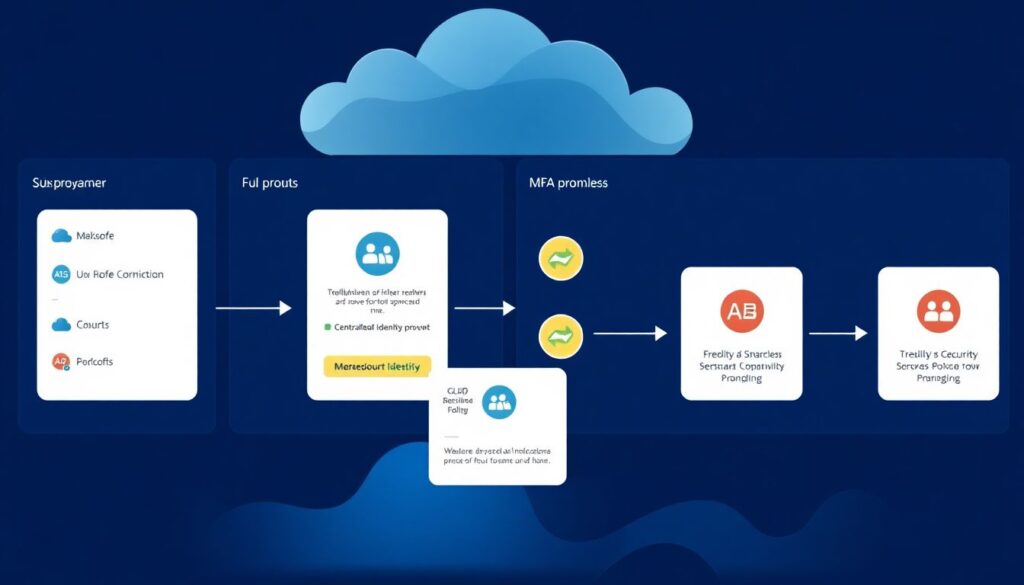
To responder à demanda por como proteger acesso à nuvem com mfa e sso de forma segura, build a consistent SSO and federation architecture and roll it out in measured phases.
- Choose and consolidate your identity provider – Select a primary IdP that supports SAML 2.0, OIDC/OAuth 2.0, SCIM provisioning, and strong MFA. Migrate remote users from local or app-specific accounts to this central identity wherever feasible.
- Define trust boundaries and authentication flows – Decide which domains and cloud accounts trust the IdP. For SaaS, use SAML or OIDC. For cloud consoles, enable SSO with short-lived tokens instead of static IAM users. Document flows for browser, mobile and CLI access.
- Onboard critical applications behind SSO – Start with high-risk apps: cloud management consoles, finance, code repositories and admin panels.
- Enable SSO in each app, mapping users via email or unique ID.
- Test group-to-role mappings in a staging tenant or test account.
- Disable local passwords or direct logins where possible after SSO is stable.
- Implement adaptive MFA everywhere sign-ins occur – Use ferramentas de sso e mfa para empresas remotas that support phishing-resistant factors.
- Prefer app-based or hardware-based factors over SMS.
- Require MFA for all external logins and any privileged action.
- Use conditional access: stricter checks for unmanaged devices, unknown networks, and high-risk users.
- Standardize federation with partners and multiple clouds – For B2B and multi-cloud:
- Use SAML or OIDC to federate to partner tenants instead of sharing accounts.
- Rely on federated roles for cloud IAM instead of long-lived keys.
- Document and periodically review all trust relationships.
- Harden sessions, tokens and recovery paths – Configure short token lifetimes for admin sessions and sensitive apps. Disable insecure recovery methods such as personal email or SMS where possible. Monitor for unusual refresh token usage and revoke tokens on device loss or suspected compromise.
Fast-track rollout path for remote-first companies
- Pick one IdP for all cloud apps and sync it with your main directory.
- Enable SSO + MFA on 3-5 critical apps (cloud console, code, finance) and migrate all remote admins first.
- Turn off legacy logins for those apps, then progressively onboard the remaining SaaS tools.
- Add conditional access rules (device, location, risk) once basic SSO and MFA are stable.
Adaptive MFA: selection, contextual triggers and failure modes
Use this checklist to verify that your adaptive MFA design is robust for remote work and cloud access:
- MFA methods include at least one phishing-resistant factor (security keys or strong device-bound authenticators) for admins and high-risk users.
- MFA is enforced for all external sign-ins to cloud portals, VPN, and high-value SaaS, not only for admins.
- Conditional access policies increase requirements for risky signals (new country, anonymous IPs, TOR, impossible travel, malware signals from endpoint tools).
- Low-friction rules exist for known good conditions (corporate devices, managed browsers, known locations) without disabling MFA entirely.
- Recovery flows are secured with strong verification, not just SMS or personal email; support staff follow a documented identity verification script.
- Fallback options are limited and logged (e.g., temporary codes, backup hardware token) with immediate review after use.
- Failed MFA attempts, lockouts and push fatigue patterns are monitored and alert the security team.
- Clear user guidance exists for lost phones or tokens, with rapid revocation of old factors and tokens.
- VIPs and highly targeted roles (finance approvals, cloud admins, domain admins) have stricter policies and extra review of login activity.
Enforcing least privilege and just-in-time access workflows
Watch for these common mistakes when implementing least privilege, especially with remote teams and cloud-native tools:
- Granting broad, permanent admin roles (“Owner”, “Super Admin”) for convenience instead of using scoped, time-bound permissions.
- Relying on manual ticket-based approvals without automation, which often leads to access never being revoked.
- Using shared admin accounts without individual attribution, making audit trails and incident response ineffective.
- Mixing duties in one role (for example, the same user creating, approving and executing financial transactions) without separation of duties.
- Ignoring non-human identities such as service accounts, CI/CD pipelines, and API keys, which often end up with excessive permissions.
- Allowing remote contractors or vendors to keep access long after projects end, due to weak offboarding practices.
- Not reviewing access grants regularly, so temporary exceptions become permanent hidden backdoors.
- Failing to document which groups map to which roles, causing “permission creep” as admins copy old settings for new users.
- Treating production and non-production environments with the same access level, increasing risk of accidental or malicious changes.
Continuous monitoring, anomaly detection and incident playbooks
There are several viable approaches to monitoring and response; choose based on your size, budget and skills:
- Cloud-native security and identity monitoring – Use built-in logging, alerting and security centers from your IdP and cloud providers. Suitable when you are mostly on a single ecosystem and want quick wins with minimal tooling overhead.
- Centralized SIEM with custom detections – Aggregate IdP, SaaS, VPN, endpoint and DNS logs into a SIEM. Build rules for suspicious remote logins, impossible travel, abnormal admin actions and mass downloads. Fits mid-size and larger organizations with a security team.
- Managed detection and response (MDR) – Outsource log analysis and 24/7 monitoring to a provider, while you keep control of IAM, SSO and MFA configs. Useful if you lack in-house expertise but still need strong segurança trabalho remoto iam sso mfa outcomes.
- Hybrid model with focused playbooks – Use cloud-native tools plus a lightweight SIEM, and document clear playbooks for remote-specific incidents: suspected account takeover, suspicious SSO activity, or abuse of elevated cloud roles.
Operational clarifications for rapid deployment
How do I prioritize which cloud apps to protect first with SSO and MFA?
Start with apps that hold sensitive data, control money, or grant admin access to infrastructure. Typical first candidates are cloud management consoles, finance systems, code repositories and HR tools. Then move to widely used collaboration and productivity apps.
Do I still need a VPN if all apps use SSO with MFA?
If most resources are SaaS or internet-facing apps protected by SSO and MFA, some organizations reduce VPN usage. You still need a VPN or zero trust network access for internal services that are not exposed to the internet or cannot integrate with SSO.
How strict should MFA be for remote workers using personal devices?
Require MFA for every external login from personal devices and add conditional access for risky locations and networks. Balance user impact by using modern authenticators and remember trusted devices for short durations, but never disable MFA entirely for unmanaged endpoints.
What is the minimum IAM setup for a small remote Brazilian company?
Use a cloud IdP, synchronize or create users there, define a few clear role groups, and protect all critical apps with SSO and MFA. Automate basic provisioning and deprovisioning, and ensure someone is accountable for reviewing access regularly.
How often should I review remote user access rights?
Perform formal access reviews at least quarterly for high-risk apps and twice per year for others. Trigger ad hoc reviews after incidents, reorganizations or major role changes. Automate review reminders and make it easy for managers to revoke unnecessary access.
How can I detect account takeover attempts against remote workers?

Enable risk-based sign-in detection in your IdP, aggregate logs into a SIEM, and alert on impossible travel, unusual MFA challenges, failed logins and new device registrations. Combine this with user education so employees quickly report suspicious prompts or messages.
What should my first incident playbook cover?
Start with a playbook for suspected account compromise: steps to lock the account, revoke tokens, reset credentials, review recent activity, notify affected parties, and harden policies. Test it with tabletop exercises involving IT, security and HR.