
Efficient IAM in the cloud means centralising identities, enforcing least privilege, and continuously monitoring access across AWS, Azure and GCP. Start by mapping roles to business tasks, integrate corporate directories and SSO, choose a clear permission model (RBAC, ABAC or hybrid), then automate reviews, logging and remediation for safe, scalable operations.
Core IAM objectives for cloud environments
- Ensure every human and workload identity is unique, auditable and traceable across all cloud solutions.
- Apply least privilege so that permissions strictly match tasks, with minimal standing admin access.
- Standardise IAM na nuvem boas práticas across AWS, Azure and GCP, reducing configuration drift.
- Centralise gestão de identidade e acesso em cloud solutions using directories, SSO and federation.
- Continuously monitor and log access decisions to detect misuse, mistakes and policy gaps early.
- Automate approvals, provisioning and reviews to keep IAM reliable as teams and workloads grow.
- Use ferramentas IAM para segurança na nuvem that integrate well with existing corporate security tools.
Designing roles and policies around least privilege
Designing roles and policies around least privilege fits organisations running workloads on AWS, Azure or GCP that already have multiple teams, environments (dev/test/prod) and some separation of duties. It is especially relevant when you need melhores práticas de permissão IAM AWS Azure GCP with auditable, repeatable patterns.
You should not start with very granular least privilege if:
- Your cloud footprint is still a small proof of concept maintained by one or two admins.
- You lack any inventory of applications, data sensitivity or business-critical processes.
- You cannot yet enforce basic hygiene (MFA for admins, separate prod accounts, logging enabled).
In these cases, begin with simpler guardrails (separated accounts/subscriptions, baseline admin roles, mandatory MFA) and evolve towards detailed least-privilege roles once you can reliably maintain and review them.
- Map business functions to roles (e.g., "Billing viewer", "Data engineer", "Kubernetes operator").
- Separate human roles from machine/workload roles to make audits and rotation easier.
- Create environment-specific variants (Dev, Test, Prod) and avoid cross-environment permissions.
- Prefer read-only roles first; add write/delete permissions only when justified and documented.
- Use conditional access (IP ranges, device compliance, time-based conditions) where your provider supports it.
Integrating identities: directories, SSO and federation
To implement IAM corporativo na nuvem securely, you need a clear identity backbone and a few essential capabilities.
- Corporate directory
- Active Directory, Azure AD / Entra ID, or another LDAP/IdP where employees are already managed.
- Consistent user lifecycle processes (hire, move, leave) integrated with HR.
- Single Sign-On (SSO)
- SSO platform that supports SAML/OIDC (e.g., Azure AD, Okta, Keycloak, corporate IdP).
- MFA enforcement for privileged roles and sensitive apps.
- Federation with cloud providers
- Federated login to AWS IAM Identity Center, Azure, and Google Cloud for workforce identities.
- Role mapping from directory groups to cloud roles (no local users for daily admin tasks).
- Workload identity mechanisms
- Managed identities/service principals for apps and services, instead of long-lived keys.
- Federated workload identities where available to avoid storing secrets in CI/CD.
- Logging and monitoring
- Central log aggregation (e.g., SIEM) receiving sign-in, audit and privilege elevation events.
- Alerts for risky patterns like failed logins, unusual locations or massive permission grants.
Permission models compared: RBAC, ABAC and hybrid approaches
Before the step-by-step, understand the differences between the main permission models used in gestão de identidade e acesso em cloud solutions.
| Model | Concept | When it fits best | Typical cloud usage |
|---|---|---|---|
| RBAC (Role-Based Access Control) | Permissions are grouped into roles; users/groups are assigned roles. | Stable job functions, clear teams and predictable tasks. | Built-in roles in AWS IAM, Azure built-in roles, GCP predefined roles. |
| ABAC (Attribute-Based Access Control) | Access based on attributes of user, resource, action, context. | Dynamic environments with many resources and tagging standards. | IAM conditions on tags/labels, IPs, time, device state. |
| Hybrid (RBAC + ABAC) | RBAC for coarse-grained roles, ABAC for fine-grained constraints. | Most medium/large organisations with multiple clouds and apps. | Custom roles plus conditions/tags across AWS, Azure and GCP. |
Use this step-by-step to choose and implement permission models safely. It covers como implementar IAM corporativo na nuvem in a way that is realistic for medium-sized Brazilian companies.
-
Clarify business domains and data sensitivity
List core domains (e.g., finance, HR, analytics, customer-facing apps) and classify their data (public, internal, confidential, highly confidential). Tie your initial IAM design to these domains rather than to specific technology components.
- Document which domains can never share admin roles (e.g., HR vs. customer data).
- Identify where regulatory or contractual constraints apply (e.g., payroll or health data).
-
Start with RBAC roles aligned to job functions
Design a small, opinionated RBAC set that matches job roles, not individuals. Use provider built-in roles as templates but remove unnecessary privileges wherever possible.
- Create 5-15 core roles per cloud (e.g., "Network admin", "DB admin", "DevOps deployer", "Security reader").
- Assign these roles to directory groups; add users only to groups, never directly to cloud roles.
-
Add ABAC using tags, labels and conditions
Once RBAC is stable, enhance it with ABAC constraints for environments, projects and data sensitivity. This balances flexibility and security without exploding the number of roles.
- Standardise resource tags/labels (e.g.,
env=dev|test|prod,business=finance,data_class=high). - Use IAM conditions so roles can only act on resources with matching tags or in specific regions.
- Restrict powerful actions (e.g., key management, network changes) to corporate IP ranges or compliant devices if your provider supports this.
- Standardise resource tags/labels (e.g.,
-
Build a hybrid RBAC+ABAC library per cloud
For melhores práticas de permissão IAM AWS Azure GCP, maintain a small library of cross-cloud patterns that your platform teams reuse. This reduces drift and speeds up onboarding.
- Define "standard" patterns, such as "Prod read-only", "Prod operator (no delete)", "Break-glass admin" with strict approvals.
- Document for each pattern: purpose, allowed actions, required tags, environments and risk level.
- Use infrastructure-as-code (IaC) templates (e.g., Terraform) for consistent deployment.
-
Pilot, review and then roll out organisation-wide
Pilot your hybrid model in one business unit before scaling. Collect feedback and adjust roles, names and conditions to reduce friction while keeping least privilege.
- Measure success: no blocked critical operations, reduced number of admin tickets, and fewer generic "owner" or "admin" assignments.
- After stabilising, roll out to other teams and deprecate old ad-hoc roles.
Fast-track path for busy teams
When you need a safer IAM model quickly, use this reduced sequence:
- Create 3-5 core RBAC roles per cloud (e.g., "Admin", "Operator", "Reader", "Security").
- Enforce tagging on all resources with at least
envandowner; block deployments without tags. - Add simple ABAC conditions so "Admin" and "Operator" roles work only on non-production by default.
- Require explicit, time-limited elevation for any production admin action with strong MFA.
Policy authoring, testing and safe deployment practices
Use this checklist to validate your IAM policy work before deploying to production environments.
- Policies are defined and stored as code (e.g., Terraform, CloudFormation, Bicep) under version control.
- Every new or changed policy has an associated ticket describing its purpose and expected impact.
- Policy documents are short, modular and reusable; you avoid one giant "catch-all" policy per account.
- You use provider policy simulators (AWS IAM Policy Simulator, Azure Access Evaluation, GCP Policy Troubleshooter) before applying changes.
- Changes are tested in non-production environments that are structurally similar to production.
- At least one peer reviews policy changes, focusing on unexpected wildcard actions and resource scopes.
- Deployments go through CI/CD pipelines with automated linting and basic security checks.
- All high-privilege policies (admin, security, key management) require explicit approval from security or platform leads.
- After deployment, you monitor logs for denied actions and unexpected new access patterns.
- You maintain a rollback plan so any risky policy change can be reverted within minutes.
Detecting and remediating the most common IAM mistakes
These mistakes appear repeatedly when organisations skip structured IAM na nuvem boas práticas.
- Using long-lived access keys for humans and workloads – Replace them with SSO for people and managed or federated identities for services.
- Granting broad "admin" or "owner" roles by default – Review and replace with limited, task-focused roles plus just-in-time elevation.
- Mixing dev, test and prod permissions – Separate environments into different accounts/subscriptions/projects and enforce environment-specific roles.
- Not enforcing MFA for privileged roles – Enable mandatory MFA for all admins and break-glass accounts on every cloud provider and IdP.
- Ignoring orphaned accounts and stale permissions – Run regular access reviews to clean up accounts of former employees and unused roles.
- Lack of standard tags and labels – Without them, ABAC is fragile; define mandatory tags and block untagged resources via policies or pipelines.
- Policies with wildcards on actions or resources – Replace
*with explicit lists; if you must use wildcards, limit them to non-production or low-risk services. - No central logging of access decisions – Forward audit logs to a central platform so security can investigate anomalies and support compliance.
- One-off manual changes in consoles – Prefer automated, reviewed changes through IaC to keep a reliable history and easy rollback.
Scaling IAM operations: monitoring, audit and automation
As your estate and teams grow, manual IAM management becomes unmanageable. These approaches help you scale safely.
- Centralised identity platform with delegated administration
Use a single IdP for workforce identities and connect all clouds to it. Delegate some administration (e.g., group membership, app access) to business admins using self-service portals with clear approval workflows.
- Policy-as-code and automated compliance checks
Adopt policy-as-code tools and CI/CD pipelines that run checks on every change. Integrate rules like "no wildcard actions" or "MFA required for admins" into your build and deployment steps.
- Continuous access review and recertification
Automate periodic reviews where managers confirm or revoke team access. Use IAM and HR integrations so that role changes and terminations are reflected quickly in permissions.
- Just-in-time access and privileged access management
Introduce tools and workflows for time-bound elevation to high-privilege roles. This drastically reduces standing admin access while keeping operations practical for on-call engineers.
Concise answers to recurring implementation questions
How do I choose between RBAC and ABAC for my cloud environment?
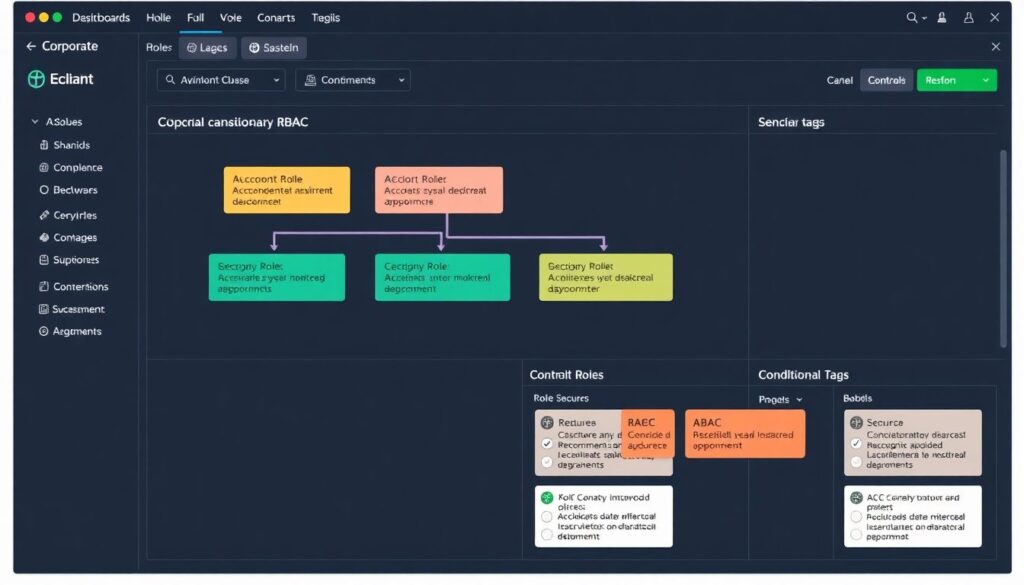
Start with RBAC based on clear job roles, then add ABAC conditions only when you have consistent tags and labels. Most companies benefit from a hybrid model where RBAC defines who can act and ABAC restricts where and on which resources they operate.
Is it safe to use built-in cloud roles without changes?
Built-in roles are a good starting point but are often broader than needed. Whenever possible, use them as templates to create custom, least-privilege roles that match your actual tasks and remove unnecessary permissions.
How frequently should I review IAM permissions?
Conduct at least quarterly access reviews for privileged roles and critical applications, and after any major organisational change. Automate detection of unused roles and permissions so you can review and remove them more often with less manual work.
Can I rely only on cloud-native IAM tools?
Cloud-native IAM tools are powerful and should be your default. For larger environments or multi-cloud strategies, complement them with central identity providers, SIEM and sometimes third-party privileged access management to keep governance consistent.
What is the safest approach for CI/CD pipelines accessing cloud resources?
Use workload identities or service principals with minimal, tightly scoped permissions instead of stored keys. Prefer short-lived tokens issued just in time, and restrict powerful actions to specific environments and deployment stages.
How do I handle emergency access without breaking least privilege?
Create dedicated break-glass accounts or roles with strong MFA and very limited holders. Protect them with strict procedures, logging and post-incident reviews so they are available for emergencies but not used for daily work.
When should I introduce just-in-time privileged access?

Introduce just-in-time access when the number of admins or production systems grows to the point where standing admin rights are hard to track. It is especially helpful before major audits or when expanding to multiple regions or clouds.